

Pay4All Shop · Débloque toutes les fonctionnalitées avancées.
WooCommerce · Débloque TWINT + vérification de l'âge
Accédez aux fonctionnalités avancés de Pay4All Shop
Neuf modules avancés pour transformer votre formulaire Pay4All Shop en vraie boutique : billetterie QR complète, règles de commande par catégorie et par marque, récupération des paniers abandonnés, filtres produits en temps réel, factures PDF, type de produit « Don » et campagnes newsletter multilingues. Distribué en direct depuis pay4all.net avec 30 jours d'essai gratuit - sans carte bancaire.
Mettez votre abonnement en pause à tout moment
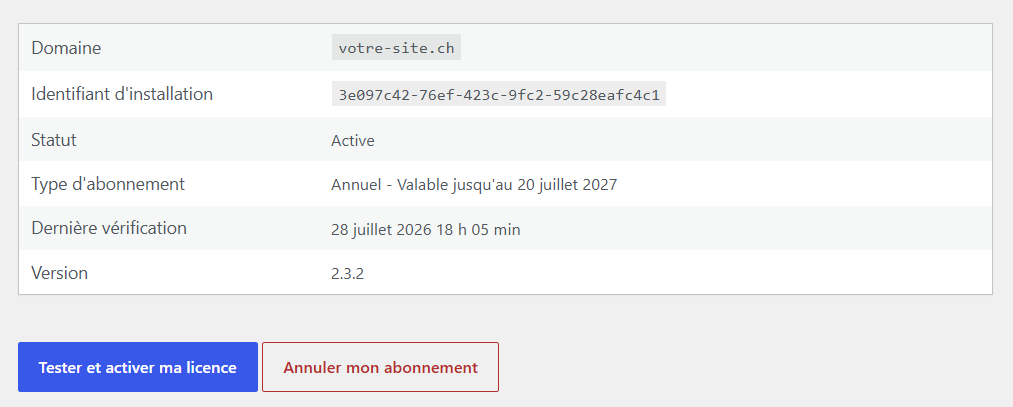
Pas besoin de résilier : suspendez votre abonnement Pay4All Pro en un clic directement depuis votre site WordPress, aussi longtemps que vous le souhaitez.
- Aucune facturation tant que l'abonnement est en pause.
- Reprise instantanée quand vous en avez besoin, sans reconfigurer.
- Vos données restent intactes (produits, catégories, marques, billets vendus).
- Idéal pour les activités saisonnières (marchés d'été, ventes de Noël, événements ponctuels).
Ce que Pay4All Pro débloque pour Pay4all Shop
Neuf modules avancés pour Pay4All Shop.
Type de produit « Formation » NEW
Pour vendre des sessions de formation : chaque produit porte une date, un lieu et un nombre de places limité. Le compteur se décrémente automatiquement à chaque inscription et le formulaire refuse toute commande au-delà. Envoi de la confirmation avec les infos de session dans la langue du participant. Idéal pour ateliers, cours, séminaires.
Type de produit « Abonnement » NEW
Nouveau type de produit avec renouvellement automatique mensuel ou annuel. Le client paie une première fois puis l'abonnement se prolonge tout seul via Stripe. Écran admin pour lister les abonnements actifs, suspendre, résilier ou rembourser. Idéal pour box mensuelles, adhésions, contenus récurrents.
Type de produit « Carte cadeau » NEW
Nouveau type de produit qui génère un code unique envoyé par e-mail au bénéficiaire, avec le montant et un message personnalisé. Le code est utilisable en ligne dans votre boutique Pay4All Shop comme moyen de paiement, mais aussi dans le magasin physique via l'écran admin de validation. Suivi du solde, historique d'utilisation et blocage automatique après épuisement.
Billetterie QR
Nouveau type de produit Billet dans le sélecteur. Chaque place vendue génère un QR unique envoyé dans l'e-mail de confirmation, avec une page publique de validation en libre-service : scannez à l'entrée avec n'importe quel smartphone, vert = valide, rouge = déjà utilisé (horodaté). Écran admin avec recherche, filtres, export CSV / XLSX, réémission et annulation manuelle.
Type de produit « Don »
Le marchand définit une liste de montants (drag & drop), choisit celui pré-sélectionné et active en option la saisie d'un montant libre. Côté client, la quantité disparaît au profit de montants prédéfinis, avec la possibilité de saisir librement un autre montant. Une solution idéale pour les associations, les projets solidaires et les campagnes de dons ponctuelles.
Catégories & règles de quantité
Regroupez vos produits en catégories multilingues et imposez des règles de commande : minimum, maximum, par multiple de N, ou minimum + multiple. Message d'erreur personnalisable par catégorie et par langue (idéal pour le vin par carton de 6). Validation en direct côté client à chaque changement de quantité, et blocage serveur au submit contre les payloads tamperisés.
Marques
Taxonomie « Marques » indépendante des catégories, avec le même jeu de règles de quantité et le même moteur de traduction. Idéal pour panacher vin par cépage ET par domaine, ou fromage par région ET par producteur - les règles s'appliquent indépendamment pour chaque taxonomie.
Paniers abandonnés
Capture automatique dès la saisie de l'e-mail par le client, envoi d'une relance après un délai configurable (10 jours par défaut), lien de récupération à usage unique qui pré-remplit tout le formulaire. Écran admin avec filtres par statut (en attente, envoyé, récupéré, converti), suppression individuelle et purge RGPD automatique après 90 jours.
Filtres produits en direct
Une barre dynamique au-dessus de la liste des produits sur la page publique : filtrer par catégorie, filtrer par marque et trier par prix. Fonctionne côté client sans rechargement - utile dès une vingtaine de produits. Palette de couleurs héritée automatiquement des Réglages du formulaire.
Couleurs personnalisées
Choix libre des couleurs du formulaire de commande (fond, texte, boutons, alerte). Personnalisation du panier abandonné et de son e-mail de relance. Aperçu en direct : les modifications sont visibles immédiatement sur votre boutique.
Newsletters multilingues
Envoyez des campagnes multilingues (FR/DE/IT/EN) à l'annuaire
des clients. Éditeur TinyMCE avec variables cliquables
({first_name}, {product_title},
{promo_code}…), templates pré-remplis pour un produit
ou un code de réduction, CTA + URL par langue.
Spooler cadencé (défaut 20 mails toutes les 15 min), envoi
immédiat ou programmé à date + heure, désinscription en un clic
conforme RGPD et notification à l'admin quand la campagne est terminée.
Facture et bulletin de commande PDF
Génération automatique d'une facture PDF pour chaque commande, jointe aux e-mails de confirmation (client + administrateur). Bulletin de commande PDF (sans les prix) téléchargeable depuis la fiche commande pour la préparation d'expédition. Logo (hauteur en cm), coordonnées marchand et position de la fenêtre C5/C6 entièrement configurables - côté droit (standard suisse) ou côté gauche, l'adresse client tombe pile en face de la fenêtre de l'enveloppe. Ventilation TVA multi-taux, mode de paiement et statut localisés dans la langue du client.
Ce que Pay4All Pro débloque pour WooCommerce
Paiement par TWINT + vérification de l'âge.
Pay4All TWINT sur WooCommerce
Encaissement TWINT automatique sur votre checkout WooCommerce :
le client paie depuis son app TWINT, la commande passe à
Payée sans action manuelle. Confirmation webhook
signée, statuts détaillés, remboursements gérés depuis
l'admin.
Gratuit sur Pay4All Shop, débloqué via Pay4All Pro sur
WooCommerce.
Pay4All Age sur WooCommerce
Vérification d'âge (pièce d'identité + selfies) sur les produits
soumis à une limite légale de votre boutique WooCommerce.
Chiffrement AES-256-GCM, panneau de contrôle sur la fiche
commande.
Gratuit sur Pay4All Shop,
débloqué via Pay4All Pro sur WooCommerce.
Comment ça marche ?
Trois étapes pour activer Pay4All Pro sur votre site.
-
Téléchargez le plugin
Téléchargez le le fichier .zipP et installez-le comme n'importe quel plugin WordPress.
-
Profitez de 30 jours gratuits
À l'activation, Pay4All Pro démarre automatiquement une période d'essai de 30 jours. Aucune carte bancaire n'est requise. Aucun compte à créer. Après activiation de l'abonnement tous les modules sont débloqués immédiatement.
-
Rattachez votre domaine à un abonnement
Avant la fin de l'essai, choisissez une offre depuis pay4all.net et rattachez votre domaine à votre abonnement. Le contrôle automatique passe à l'état « active » immédiateemnt.
Tarifs pour Pay4All Pro
Pay4All Shop Débloque les fonctionnalitées avancées.
WooCommerce Débloque TWINT + vérification de l'âge.
Essai gratuit
1 MOIS
Testez le$ 030 jours
- Toutes les fonctions et modules durant 1 mois
- Pas de carte bancaire requise
- Passage manuel à un abonnement
Mensuel
$ 9 par mois / domaine
Pay4All Shop- Toutes les fonctionnalitées avancées
- Résiliable à tout moment
- Pay4All Vérification Age
- Pay4All TWINT
- Résiliable à tout moment
Annuel 2 mois offerts Promo à vie
$ 90$ 70 par an / domaine-35%
- Tout ce qui est inclus dans l'offre mensuelle
- Économie équivalente à 2 mois
- Résiliable à tout moment
Tarifs Agence
Une seule licence pour gérer plusieurs sites, idéal pour les agences web et intégrateurs multi-clients.
Agence 10 sites AGENCE
$ 290 par an
- Jusqu'à 10 domaines couverts par une seule licence
- Toutes les fonctions Pay4All Pro incluses
- Pool de domaines géré depuis le tableau de bord
- Résiliable à tout moment
Agence 20 sites AGENCE
$ 380 par an
- Jusqu'à 20 domaines couverts par une seule licence
- Toutes les fonctions Pay4All Pro incluses
- Pool de domaines géré depuis le tableau de bord
- Résiliable à tout moment
Une seule licence par domaine.
Pay4All Shop est gratuit dans sa version de base. Pay4All Pro débloque toutes les fonctionnalités avancées de Pay4All Shop, y compris la vérification de l'âge.
Pour WooCommerce, un abonnement Pay4All Pro est requis.
Questions fréquentes
Ai-je besoin de Pay4All Shop pour utiliser Pay4All Pro ?
Oui. Pay4All Pro est une extension qui ajoute des modules par-dessus Pay4All Shop. Vous devez installer et activer les deux plugins (dans cet ordre de préférence : Pay4All Shop d'abord, Pay4All Pro ensuite).
L'essai gratuit demande-t-il une carte bancaire ?
Non. L'essai de 30 jours démarre automatiquement à la première activation du plugin, sans carte, sans compte à créer. Tous les modules sont débloqués immédiatement. À l'issue des 30 jours, les modules Pro se désactivent silencieusement si aucun abonnement n'est rattaché - vos données restent intactes.
Puis-je mettre mon abonnement en pause ?
Oui, à tout moment et directement depuis votre site WordPress (menu Pay4All Pro > Abonnement). Aucune facturation pendant la pause, vos données restent intactes (produits, catégories, marques, billets vendus) et vous reprenez votre abonnement d'un clic quand vous en avez besoin. Idéal pour les activités saisonnières comme les marchés d'été ou les ventes de Noël.
Que se passe-t-il pour mes données si je désactive Pay4All Pro ?
Vos catégories, marques, billets déjà vendus et paniers abandonnés restent en base. Ils redeviendront accessibles à la réactivation. Pendant que Pay4All Pro est désactivé, les formulaires Pay4All Shop continuent à fonctionner : ils ignorent simplement les règles de quantité et n'affichent plus les filtres.
Puis-je utiliser Pay4All Pro sur plusieurs sites ?
Oui. Chaque licence couvre un nom de domaine. Vous pouvez rattacher autant de domaines que vous voulez à votre compte pay4all.net, la facturation se fait par domaine actif.
Comment se passent les mises à jour ?
Pay4All Pro n'est pas distribué depuis WordPress.org. Les mises à jour arrivent directement depuis pay4all.net et apparaissent dans l'écran Extensions de WordPress comme n'importe quelle mise à jour officielle. Vous cliquez Mettre à jour, c'est tout. Les mises à jour restent accessibles même après expiration de la licence (mais les modules Pro eux-mêmes se désactivent).
Ma licence expire dans 5 jours et pay4all.net est en panne. Que se passe-t-il ?
Pay4All Pro conserve le dernier statut valide pendant 72 heures en cas d'indisponibilité de pay4all.net. Si la panne dépasse ce délai, le plugin bascule en mode essai expiré côté client mais n'efface aucune donnée. Dès que la SaaS répond à nouveau, le statut se resynchronise automatiquement lors du contrôle suivant (dans les 48 h).
Le plugin est-il compatible avec WPML / Polylang ?
Oui. Les catégories, marques et messages d'erreur sont multilingues nativement (FR / DE / IT / EN). Les templates d'e-mail de relance de panier abandonné sont également traduits. La billetterie QR renvoie le client sur la page de validation dans la langue d'origine de sa commande.
Y a-t-il un support technique ?
Oui, inclus dans tous les abonnements Pay4All Pro. Envoyez-nous un e-mail depuis votre espace client pay4all.net (bouton Contacter le support). Réponse sous 48 h ouvrées, souvent moins.